
Overview
At WWDC26 in June, Apple announced a new wave of updates coming to the App Store, both for consumers, and for developers. One of these updates was about support for new creative assets, specifically the App Store Search Page Header and Product Page Header assets.
On October 5, 2026, Apple made these assets available. Let’s see what they are and how you can use them to your advantage.
What does this mean for you?
As a developer on App Store, you can now submit these two additional assets to be displayed on your app’s Search result section/tile, and on your app’s product page respectively. These new assets give you the opportunity to showcase more of your app’s purpose & functionality to the viewer, and more importantly your brand.
Let’s take a look at the design specifications and guidelines of these new assets and more importantly how you can take advantage of them to push your app’s brand on the App Store, and have a strong first impression that will convert to downloads.
Apple walks through both placements in the WWDC26 session Enhance your presence on the App Store. Both appear on iOS 27 and iPadOS 27 and later.
Search Page Header
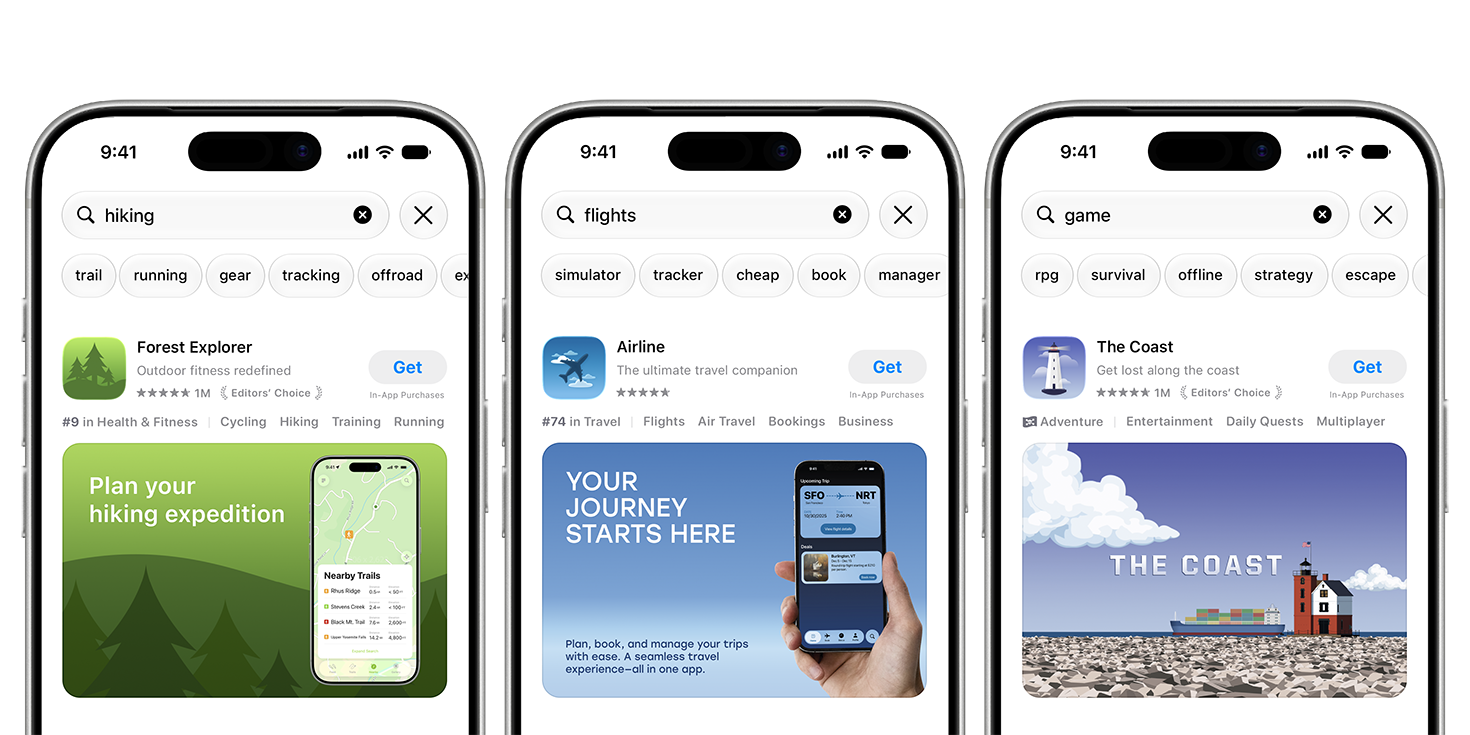
Search Header Assets will appear in your app’s App Store search view tile. If present, users will see the search header asset instead of your first-3 store screenshots.
Design Media
Search Page Headers can be an image or a video that’ll autoplay in a loop for users. This unlocks quite a bit of new experiences/branding opportunities you can include right in your search page header. More on that in a bit.
Specs
| Image | Video | |
|---|---|---|
| Aspect ratio | 3:2 | 3:2 |
| Resolution | Min 1920 x 1280 px, max 3840 x 2560 px | Min 1920 x 1280 px, max 3840 x 2560 px |
| Format | .jpeg, .jpg or .png | .mov, .m4v or .mp4 |
| Frame rate | n/a | 30 or 60 fps |
| Length | n/a | 5 to 30 seconds |
| Audio | n/a | Always muted in search results |
Images can’t include alpha channels or transparency. Source: Apple creative assets specifications.
Design Tips
What to do
To get the best results from your Search page header asset, try following these rules:
- Focus on selling the viewer one thing in your app. Don’t try to sell multiple app features or benefits in the asset. They should primarily focus on the purpose of your app, and what most users can expect to achieve/gain with or from your app.
- Be intentional with your wording. Your app’s purpose should be obvious to the viewer at first glance.
- Readability should be one of your goals. These assets are going to be viewed on a smaller screen with limited content space, so make sure all the content of your asset is clearly readable from a normal mobile viewing distance.
- Use a video if you can. Human eyes are conditioned to notice things that move. So, having a video that’s pleasing to the eye, and is nicely designed can make the viewers stop scrolling, and take a look at your app.
- Add some fun/cozy minimalistic elements in your video that make the user pause. A moving background is a nice touch.
Apple’s asset best practices also suggest:
- State the obvious. People in search are usually looking for something specific, so your app’s purpose should be clear at a glance.
- Show the firsthand experience. Share your interface, content or gameplay so people can decide quickly whether they want the app.
- Keep key content near the center, inside the safe area, so it isn’t clipped on other devices and orientations.
What not to do
- Don’t include things outside of your app’s core experience in these assets.
- Apple specifically mentions not to include pricing, discounts, website URLs, or copyright symbols in your assets.
- Don’t add unverified claims in your assets, like saying “Number one on App Store” or “Apple Design Award winner”, if you can’t verify those claims.
- No mention of other apps or external marketplaces/platforms in the design.
- Apple-designated recognitions must be avoided as specified by Apple.
Not following these rules may result in your app update being rejected, or removal of your app from App Store.
Assets also need to meet a 4+ age rating, even if your app is rated higher, and they’re reviewed against App Review Guideline 2.3 (Accurate Metadata). Source: Apple asset best practices.
Product Page Header
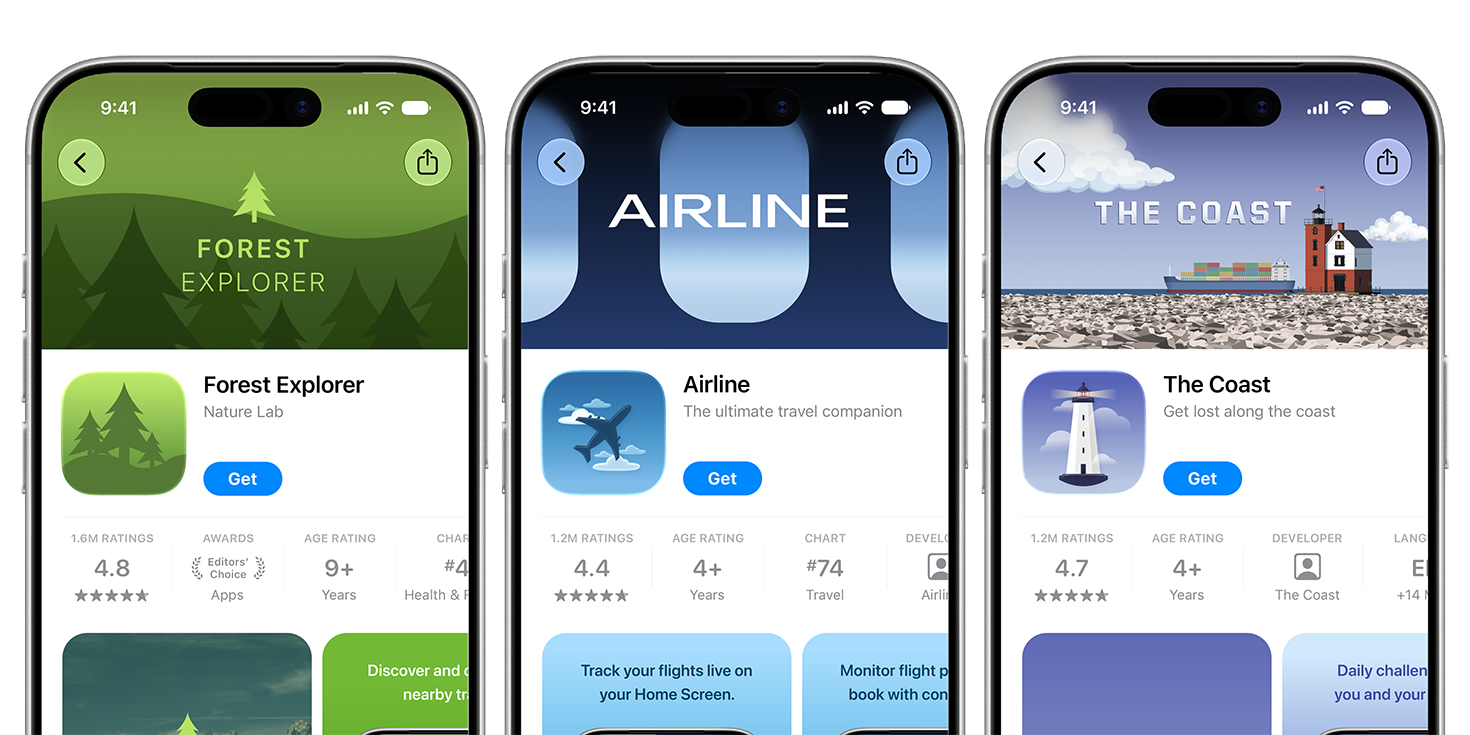
Product page header will appear above your app’s icon and name/subtitle row. They’re like the hero banner on your site, but now on your app’s product page. Using them effectively to sell what your app’s about can definitely increase chances of users downloading the app.
Design Media
Similar to search page headers, these can be an image or video autoplaying on loop. You can design them in a way that contributes to the overall product page of your app, but also doesn’t repeat what you’re already telling/showing with your other metadata and screenshots.
Specs
| Image | Video | |
|---|---|---|
| Aspect ratio | 21:9 | 21:9 |
| Resolution | 3840 x 1646 px | 3840 x 1646 px |
| Format | .jpeg, .jpg or .png | .mov, .m4v or .mp4 |
| Frame rate | n/a | 30 or 60 fps |
| Length | n/a | 5 to 30 seconds |
| Audio | n/a | Muted by default, people can unmute |
Images can’t include alpha channels or transparency. Source: Apple creative assets specifications.
Design Tips
What to do
- All the design tips that apply to images, apply to the video asset as well.
- Video assets autoplay in a continuous loop. Make sure your video’s start and end sync accordingly to give the impression that it’s in an infinite loop.
- Videos are muted by default in search results, and they can’t be unmuted there. On your product page they’re also muted by default, but people can unmute them. Make sure your video’s audio, if present, is not loud overall, and starts with a low volume initially.
Apple’s asset best practices also suggest:
- Focus on a single, clear idea. Dense or cluttered assets dilute your impact.
- Design for a first-time visitor. Think about what’s most compelling to someone who has never seen your app.
- Pick a strong poster frame. It’s the first image people see before the video plays, so it should work on its own.
- Treat audio as “brand texture” rather than information, like a short music loop that loops cleanly with the video.
What not to do
- Video graphics should be pleasant, and not too dark that users can’t make sense of. They should be inviting to the user.
- Slow paced videos are much better than fast moving video. They give users time to understand what’s going on.
- No loud audio in your video.
Use one asset for both. Apple suggests using the same creative for your header and search results to strengthen brand recognition, and product page optimization to test alternative header visuals.
Bonus: swap assets without a new submission
Once assets are approved in Asset Library, you can swap them on your product page and in search results. Apple’s October 5 announcement describes submitting assets for approval ahead of a seasonal campaign and using them later. Prepare seasonal or campaign versions ahead of time, then switch them when you’re ready.
Conclusion
Search page header and product page header will now be one of the first things many people will see on App Store if you’ve added them. Make sure your first impression is the best. Overall, the design guidelines for these come down to a few rules: one clear idea, obvious purpose, readable at phone size, not too fast, but a seamless experience for video assets, and nothing outside your app’s core experience.
Create Image Assets in Mockups Playground
Use Mockups Playground to create these assets.