Two important updates for AppShots users, new and existing: AppShots is now available on the App Store, and future updates will be delivered there instead of through Lemon Squeezy.
No more downloading an installer from the Lemon Squeezy dashboard every time there’s a new version. Download once from the App Store, and updates arrive the way they do for any other Mac app.
What’s changing
- AppShots is now on the App Store.
- Lemon Squeezy distribution is discontinued. Future updates will be served through the App Store for the time being.
If you bought AppShots on Lemon Squeezy
You don’t have to buy it again. If you purchased AppShots through Lemon Squeezy, there’s a simple way to move over to the App Store version.
This applies to everyone with a lifetime purchase or an active monthly or yearly subscription. If that’s you, I’ll give you lifetime access to AppShots on the App Store.
To do that, I need a unique ID from your copy of AppShots. It’s generated when you download the app from the App Store, and it ties your App Store version to your purchase.
How to get your purchase ID
-
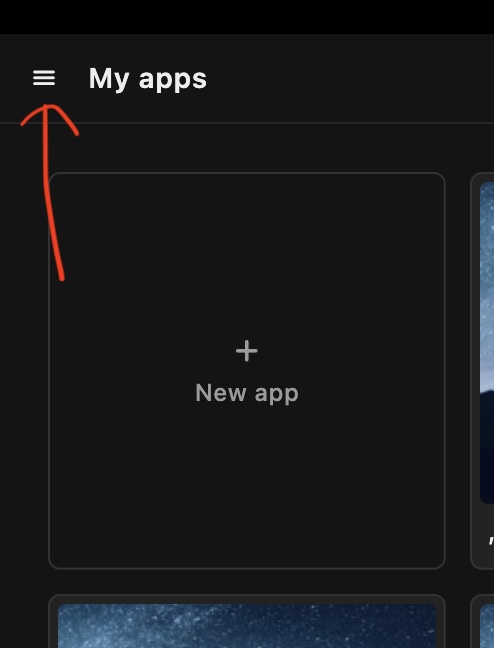
Download AppShots from the App Store, open it, and click the hamburger menu button in the top-left corner of the header.
-
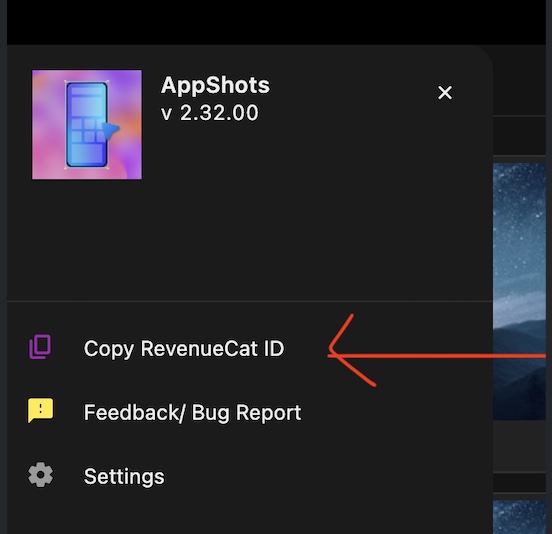
Click Copy RevenueCat ID.
-
Send me that ID along with the email you purchased with. Posting it in the AppShots Discord server is preferred, since it helps me respond to everyone efficiently. You can also reply to the email or write to takrutvik@gmail.com.
Once I have your info, I’ll check it against your Lemon Squeezy purchase and grant you lifetime access on the App Store, with no second purchase.
Why move to the App Store
It has nothing to do with Lemon Squeezy as a platform. It’s a change to my distribution channel, driven by where tech is today: AI models and tools make it possible to reverse engineer app installers. Sharing installers outside the App Store feels insecure to me because of that risk. App Store distribution remains secure enough for now, so that’s where AppShots is going to live for the time being.
What’s new in the latest release
The latest version is live on the App Store:
- Import custom design assets (images and SVGs) and customize them in AppShots.
- Add a background and a border to existing design assets and imported ones.
See the full walkthrough in Import Custom Assets into Store Screenshots.
What’s coming next
- iPhone Duo support.
- Desktop app screenshots support.
The roadmap has more details.
That’s it for today. I’m excited for what’s coming next for AppShots, and for you to get your hands on those updates.
Thanks,
Rutvik